Storefront platform
Product options and add-ons in storefront carts
I built product options for the inSales storefront library, from the selection component and pricing to cart operations, so shoppers can buy the same variant with different extras as separate cart lines.
- My role
- Frontend developer: ui-accessories component, pricing, cart API, developer docs
- Period
- Jan 2025 – Apr 2025
- Skills
On this page
The problem
Merchants wanted to sell extras and services with a product: gift packaging, a greeting card, a ribbon. Some choices are required, some optional, and each group has its own limits. Shoppers need to see the final price before they add the item to the cart.
The hard part was the cart. The shared storefront library, CommonJS, treated a cart line as a product variant. With add-ons that stopped being true: a Classic bouquet in standard wrap and the same bouquet in a gift box with a card are two different purchases with different prices. Every place that found a cart item by variant ID could now hit the wrong line: quantity changes, deletion, counters on the product page and availability checks.
My role
I built the storefront side in CommonJS: the ui-accessories component, pricing, cart operations, how options appear in the cart, and documentation for store developers. Backend developers provided the cart endpoint that accepts option values. My code went through review and QA.
What I built
One component for required and optional groups
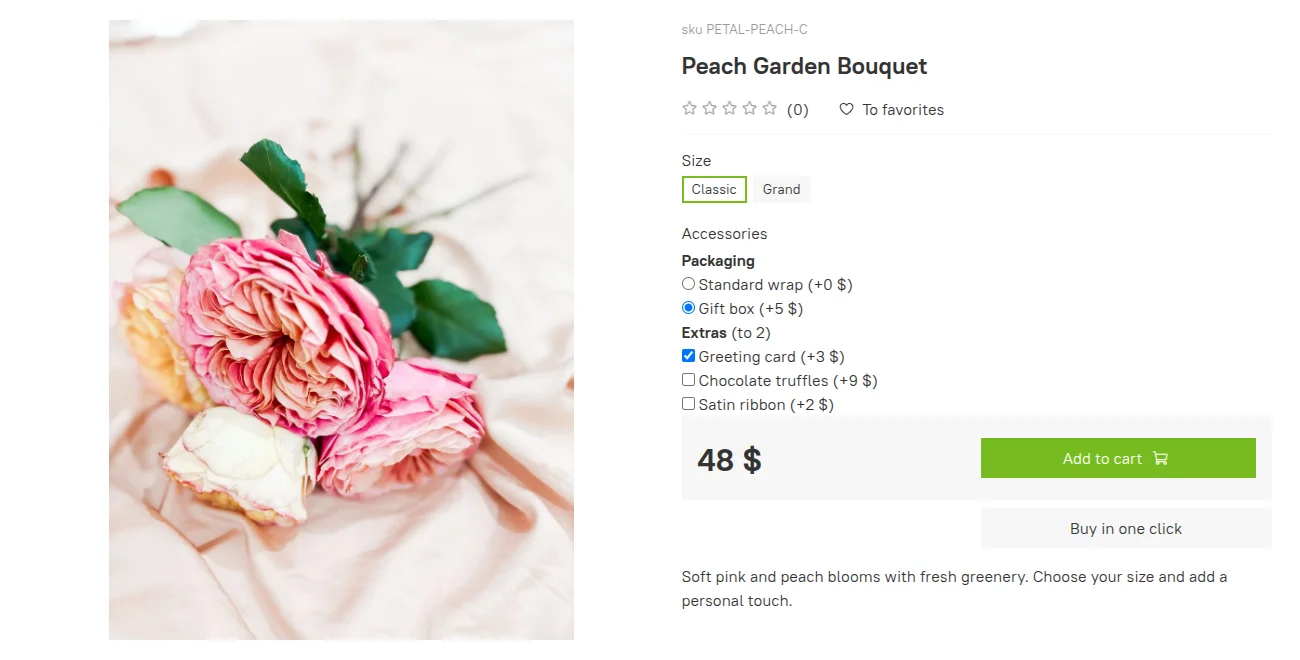
ui-accessories attaches through data-accessories="{{ product.id }}" and renders option groups from markup templates, so it works in standard widgets and in custom designs. Each group carries its minimum and maximum count. In the demo store, packaging is a required single choice and extras allow up to two. I chose to render options from data attributes instead of tying them to the product page: AJAX-loaded products needed the same rendering, and adding a product with required options from a category preview needs the option data too.
Price follows the variant and the add-ons
The displayed price recalculates when the shopper changes either the variant or the options. In the demo store, a gift box (+$5) and a greeting card (+$3) take the Classic bouquet from $40 to $48, and the same extras take Grand from $60 to $68. The price checks couldn't treat zero as "no value": a variant can legitimately cost nothing, and standard wrap adds $0.
A cart line is a variant plus its options
I extended Cart.add, Cart.set, Cart.delete and the cart's task queue to carry accessory_value_ids together with the variant ID, grouped under accessoriable_variant_ids. A quantity change or deletion now targets one exact combination, not every line with that variant. The cart widget shows the selected option names and their prices on each line.
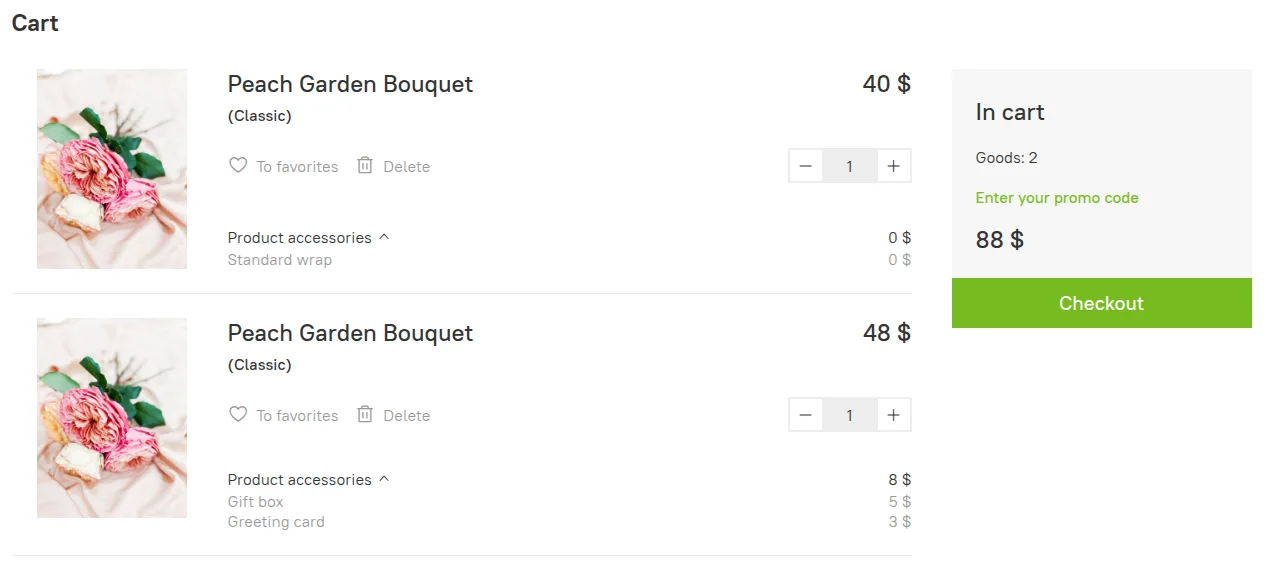 Demo store: one Classic variant, two cart lines with their own options, quantities and prices.
Counters and availability across combinations
Two questions that used to have one answer now needed different ones. The product page counter and the "Add to cart" button follow the selected combination. Switching from standard wrap to the gift configuration changes the counter, and deleting the standard line brings back "Add to cart" while the gift line stays in the cart. Availability belongs to the variant: lines with different options are still units of the same product, so the check adds up their quantities. I went through the places that looked up cart items by variant ID and made each one ask the right question. The notification widget also got its own error for a wrong number of selected options.
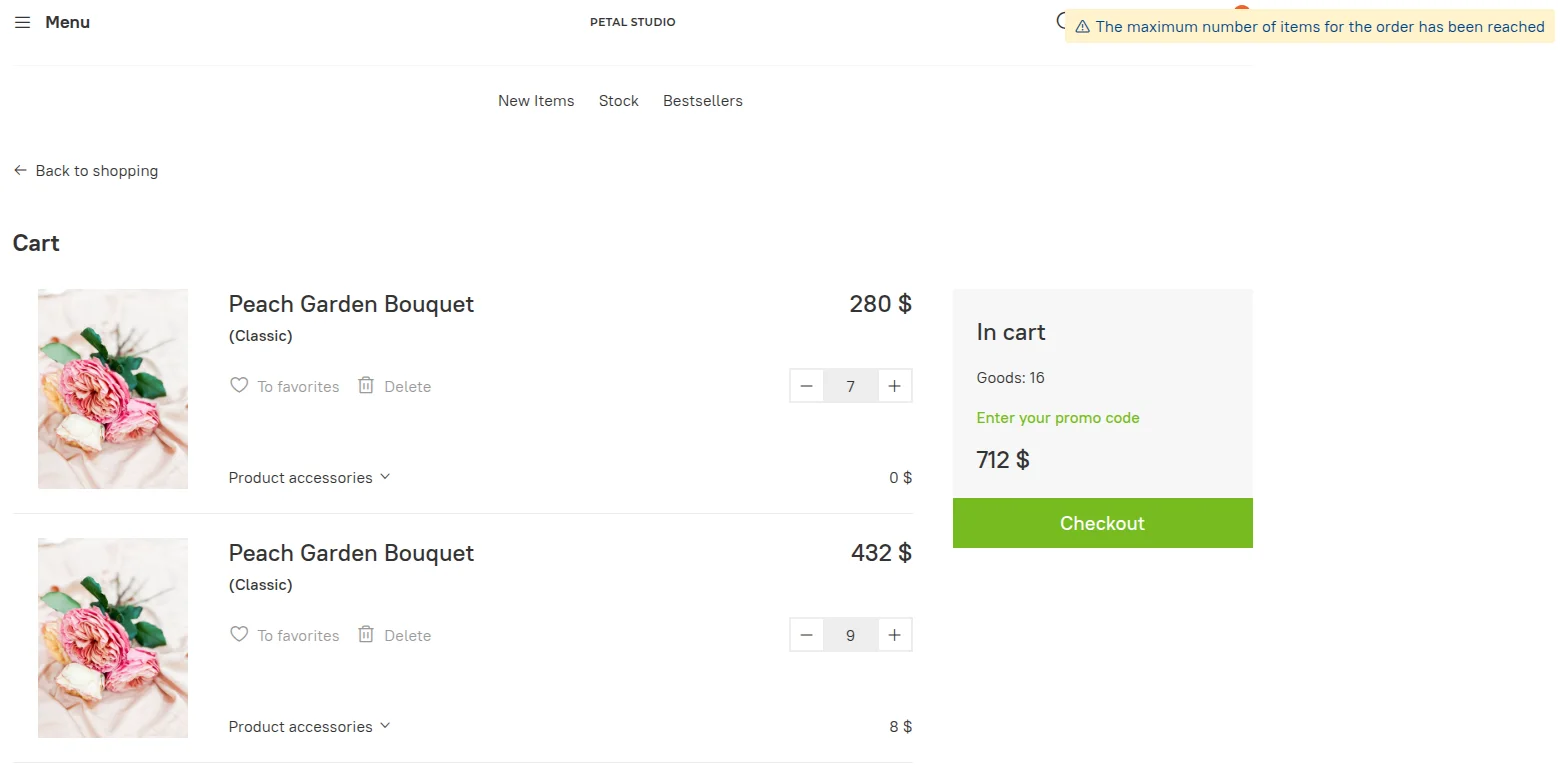 Demo store: 7 + 9 units of the same variant in two lines; adding more shows the limit warning.
Compatibility and documentation
Options had to work in the product widget, AJAX products, category previews, modals, multi-warehouse carts and older templates. I wrote the test checklist for adding, changing and deleting regular products, multi-warehouse products and products with options in each of those places, plus price changes when switching variants and options. I also documented the options API for store developers who build product cards and carts in their own templates.
Results
- Shoppers can choose required and optional add-ons, see the final price and add that exact combination to the cart.
- The same variant can sit in the cart as separate lines; quantity changes and deletion affect only the chosen line.
- Store developers got a component and a documented cart API for options in their own templates.
- Options work in product widgets and AJAX-loaded products. The library this was built into is described in the CommonJS case.
The screenshots come from an inSales demo store with licensed stock photos. Products and prices are made up for the demo; they are not sales data.