Architecture
One CAPTCHA token, two waiting forms: what invisible verification broke across a platform
Invisible CAPTCHA looks like a script tag. Across several generations of store forms it turned into async-state bugs and a production rollback caused by a settings record that didn't exist.
On this page
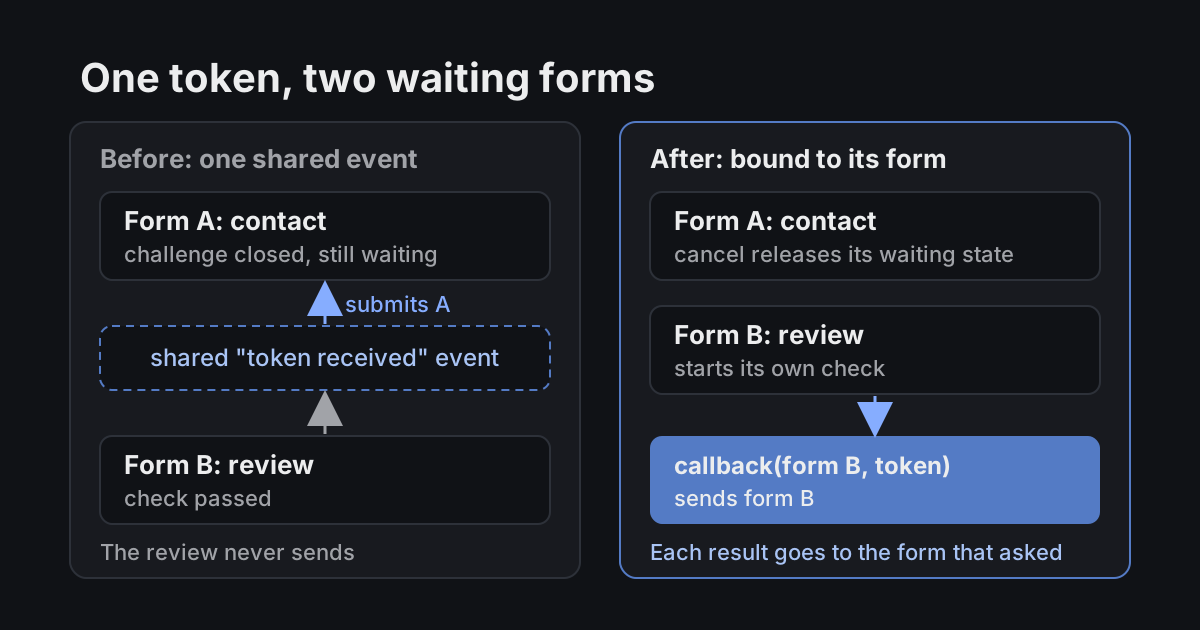
A customer opens the contact form in an online store, types a question and presses Send. The CAPTCHA provider decides it wants a challenge this time. The customer closes it, changes their mind and scrolls down to leave a product review instead. This time the check passes. And the page sends the contact form. The review just sits there with its spinner.
Nothing in that scene is exotic. It's what happens when a verification result is announced to everyone who is waiting instead of being delivered to the form that asked for it.
I owned the frontend side of bot protection at inSales, an e-commerce platform with 60,000+ merchants. First I moved the supported forms to Google reCAPTCHA Invisible (October to November 2023). Later I added Yandex SmartCaptcha as a second provider that a merchant can pick with one store setting: active work started on June 30, 2025, and the main release shipped on August 26. Merchants had asked for an alternative because of availability and data-handling concerns, so Google stayed available too. From the outside, all of this looks like adding a script tag. In practice it was a set of async-state problems spread across storefront library forms, three checkout generations, two generations of customer accounts and merchant sign-in.
Invisible doesn't mean nobody sees it
The invisible mode removes the "I'm not a robot" checkbox from the normal flow. The customer fills in the fields and presses the button. The form runs its own validation, asks the provider for a token and only then continues the request. Our server checks the token before accepting it.
But "invisible" describes only the happy path. The provider can still show a challenge, and the customer can close it, fail it or leave the tab long enough for the token to expire. So every form has a third state besides "idle" and "sending": waiting for verification. Most of the bugs lived in that state.
The token has to know whose it is
The early integration had a shared "verification finished" event, and every form that started a check subscribed to it. On top of that, the event bus replayed its last payload to new subscribers, so a form could receive a result produced before it had even asked.
With two forms on a page, that gives you exactly the scene above. Form A is still waiting after its challenge was closed, form B passes, and the shared event resumes A.
// Before: whoever is waiting reacts to whatever result arrives
eventBus.subscribe('captcha:response', ({ token }) => {
  submitWithToken(pendingForm, token)
})
The fix was to stop broadcasting. Each check starts for a specific form, and its callback receives that form together with its token. The public API for custom store forms followed the same rule:
function submitReview(form) {
  // Returns a token if this form already has one.
  // Otherwise starts verification and later calls submitReview(form, token).
  const token = captcha.executeInvisible(form, submitReview)
  if (!token) return

  sendForm(form, token)
}
The change is small, but the code now answers a different question. Not "did someone pass a check?" but "did this form pass its own check?" When the Yandex integration came two years later, it followed the same rule.
Waiting for a token is not "already sent"
Forms block double submits while a request is in flight. Our early handling treated waiting for the provider the same way. When the customer closed the challenge, the form stayed in "sending" forever: disabled button, no way to try again.
I made a cancelled challenge release the waiting state, reset the widget before a retry and request a fresh token instead of reusing one that might have expired during a long pause. We checked it on validation errors, a reopened modal and a repeated one-click order, because each of those paths had its own submit handler.
Two loaders, one global object
On some pages, a built-in platform form and a storefront widget could both load SmartCaptcha. When the second one injected the script again, the provider created a new window.smartCaptcha that knew nothing about the widgets the first one had rendered.
For the customer, this looked like a dead submit button. In the console you'd see Widget with id … does not exist. And the outcome depended on load order. If the storefront library loaded first, the platform template saw the script and skipped it. In the opposite order, a wrong condition in the library let it inject a second copy.
Neither side owns the page, so both have to behave like guests:
let sdkReady

function loadCaptchaSdk() {
  // Reuse a script that another part of the page has already added
  const existingScript = document.querySelector(`script[src^="${SDK_ORIGIN}"]`)
  sdkReady ??= existingScript ? waitForGlobal('smartCaptcha') : injectScript(SDK_URL)
  return sdkReady
}
I fixed the loading in the server templates and in the library, and later went back to the library to close the one load sequence that still slipped through.
The rollback: a setting that didn't exist
On August 8, 2025, the first production rollout of provider choice for built-in store forms went out behind a feature flag. In some existing stores the CAPTCHA simply didn't render. On fresh test accounts everything worked. We rolled it back.
The obvious guess was an empty provider value. It was worse than that: some older stores had no settings record at all. The condition expected an explicit google or yandex, got nothing, chose neither and left the form without a CAPTCHA.
// Before: every consumer read the raw setting
const provider = store.settings?.captchaProvider
if (provider === 'yandex') renderYandexCaptcha()
else if (provider === 'google') renderGoogleCaptcha()
// A store with no settings record falls through both branches

// After: one owner of the answer, with a default
function captchaProvider(store: Store): 'google' | 'yandex' {
  return store.settings?.captchaProvider === 'yandex' ? 'yandex' : 'google'
}
The real fix lived on the server. I added one method to the account model that returns the provider and falls back to Google when nothing is saved, which is what every existing store had been using anyway. Then I moved the consumers to that method, checked the store that had failed and our own test forms on staging, and re-released on August 11.
The clue was in the part that worked. New test accounts are created with today's data shape, so they couldn't show a bug that lived in data from years ago.
Not every CAPTCHA bug was mine, or about CAPTCHA
The same symptom, "the form doesn't send", had different causes: a missing token, a lost widget instance, a server error, an ad blocker or the provider itself. I added logging for SmartCaptcha's network-error and javascript-error events and collected reproductions with the console, network log, HAR file and video.
- In Safari, a click after passing a challenge could scroll the page to the top. I fixed it once in the shared library integration by destroying and re-rendering the SmartCaptcha instance, instead of patching every form type.
- On some Android devices, the on-screen keyboard covered the challenge input. Changing the viewport helped only on some devices. That problem was inside the provider's widget, so I built a separate test page, recorded video, listed the devices and sent everything to Yandex Cloud support.
- One "CAPTCHA hangs on sign-in" report turned out to be a sign-in bug. After the timer ran out, the server answered "too many attempts", but the error block no longer showed the message. I fixed the message and the button state and filed it under its real name.
Where it ended up
By the main release, both providers ran in the storefront library's four form families, checkout 1.0 to 3.0, customer accounts 1.0 and 2.0 and merchant sign-in. One store setting picks the provider for supported forms, while each form's existing rules still decide when a check is needed. Store developers got documented APIs to connect either provider to their own forms. Maintenance continued after the release: fixing sign-in after the browser's Back button in September 2025 and adding the check to custom domain setup in 2026. The full project is in the form protection case.
What I'd check on any team shipping this
- Bind every async result to the thing that asked for it. A global "done" event works with one form on a page, and real pages have several.
- Make third-party SDK loading idempotent at the page level. Your code is probably not the only code on that page that wants the same script.
- Test defaults against missing records, not only empty values. If a feature reads settings, try it on the oldest account you can find.
- Treat "waiting for verification" as its own state with its own cancel path, separate from "request in flight".

AI-native Senior Frontend Engineer